


Have you ever clicked on a website and then left because it took too long to load? Of course you have. We all have. And here is the thing: when someone does that to your website, Google notices.
Website speed is not just about user experience — it is a direct ranking factor. That means Google uses how fast your website loads as part of its decision about where to place you in search results. A slow website hurts your rankings. A fast one helps them.
In this article, we will explain why speed matters so much, how Google measures it, and what you can do to make your site faster — even if you are not technical.
Why Google Cares About How Fast Your Website Loads
Google’s entire business model depends on giving users the best possible search experience. If someone clicks a search result and the website is slow or broken, that person has a bad experience — and Google does not want that associated with its results.
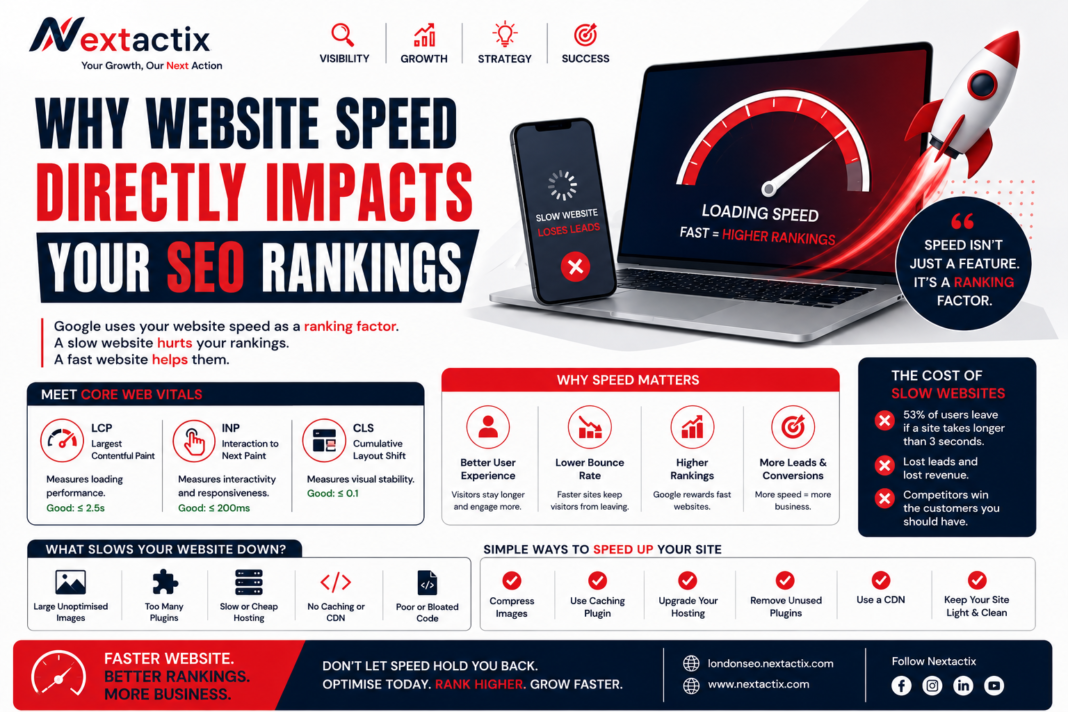
This is why, since 2010, Google has officially included page speed as a ranking signal. And in 2021, Google went even further by introducing something called Core Web Vitals — a set of specific measurements related to how pages load and respond for real users.
In simple terms: Google rewards fast websites and penalises slow ones.
What Are Core Web Vitals?
You might have seen this term in Google Search Console. Core Web Vitals are three specific measurements Google uses to assess the real-world experience of loading your website:
Largest Contentful Paint (LCP)
This measures how long it takes for the main content of your page to appear on screen. Google wants this to happen within 2.5 seconds. If it takes longer, your score suffers.
Interaction to Next Paint (INP)
This measures how quickly your page responds when a user does something — clicks a button, taps a menu, fills in a form. A slow response here makes a page feel sluggish and frustrating to use.
Cumulative Layout Shift (CLS)
This measures whether elements on your page move around as it loads. You know when you go to click something and it suddenly jumps out of the way? That is a high CLS score — and it is something Google penalises.
You can check your own website’s Core Web Vitals scores for free using Google’s PageSpeed Insights tool or directly through Google Search Console.
How Speed Affects More Than Just Rankings
Even beyond SEO, a slow website costs you business in a very direct way.
Research consistently shows that if a page takes more than three seconds to load on a mobile phone, more than half of users will leave before it even finishes loading. On mobile — where most local searches happen — this is a serious problem.
Think about it from the customer’s perspective. They have searched for your service, found your website, and clicked on it. But the page is not loading. After two or three seconds, they press back and click on your competitor instead. That is a lead you had and lost, not because of your price or your quality, but because of your website’s speed.
What Makes a Website Slow?
There are several common culprits that slow websites down. Understanding them helps you have more informed conversations with your developer or hosting provider:
Images That Are Too Large
This is the most common cause of slow websites. If you upload a photo directly from your camera or phone, it might be several megabytes in size. A web page full of these images will load very slowly. Images should be compressed and resized before being used on a website.
Too Many Plugins
WordPress websites in particular can accumulate plugins over time. Every plugin adds code that the browser has to load. Ten poorly built plugins can slow a site down significantly. Audit your plugins and remove anything you do not genuinely need.
Cheap or Slow Hosting
Your web hosting is the foundation your website sits on. Budget shared hosting can be fine for personal blogs, but for a business website that needs to rank on Google, investing in good quality hosting makes a real difference. Look for hosting providers that are specifically optimised for the UK market.
No Caching
Caching means storing a version of your page so it does not have to be rebuilt from scratch every time someone visits. Without caching, every visitor causes your server to do a lot of work. A good caching plugin or CDN (Content Delivery Network) can speed up loading times significantly.
Unoptimised Code
Websites built with old themes, or by developers who did not follow best practices, can have bloated code that slows everything down. This is harder to fix without technical help, but it is worth investigating if your site is persistently slow.
How to Check Your Website Speed Right Now
Here are three free tools you can use today to see how fast your website loads:
- Google PageSpeed Insights (pagespeed.web.dev) — gives you a score out of 100 for both mobile and desktop, with specific suggestions for improvement
- GTmetrix (gtmetrix.com) — shows detailed analysis of what is slowing your site down
- Google Search Console — under the Core Web Vitals section, shows you real-world data from actual visitors to your site
When you check your score, pay particular attention to your mobile score. Most of your visitors are on phones, and Google predominantly uses your mobile site to determine your rankings.
Simple Things You Can Do to Speed Up Your Website
You do not need to be a developer to make meaningful improvements. Here are some things you can do or ask your developer to do:
- Compress all images on your site — use a free tool like Squoosh or TinyPNG, or install a WordPress plugin that does this automatically
- Install a caching plugin — for WordPress sites, WP Rocket or W3 Total Cache are popular options
- Switch to faster hosting — if your site consistently scores poorly, your hosting may be the problem
- Remove plugins you are not using
- Use a Content Delivery Network (CDN) — this stores copies of your site on servers around the world so it loads faster for visitors regardless of their location
Making even two or three of these changes can result in a noticeable improvement to both your loading speed and your rankings.
Speed and Local SEO: The Connection
For local businesses in particular, website speed is even more critical. When someone searches for a local service on their phone, they are often on a mobile connection — not always the fastest. A website that is slow on a fast Wi-Fi connection will be even slower on a patchy 4G signal.
Google knows this. It factors in mobile performance heavily when ranking local search results. Two businesses with similar content and similar backlinks can have very different rankings if one has a fast mobile site and the other does not.
If you are investing time and money into SEO — creating content, building links, optimising your Google Business Profile — a slow website can undermine all of that work. Speed is not a bonus. It is a foundation.
Final Thoughts
Website speed is one of the clearest examples of where user experience and SEO meet. Google ranks fast websites higher because fast websites give users a better experience. It is as simple as that.
The good news is that speed is fixable. Unlike some aspects of SEO that take months to see results, improving your website speed can have a visible impact relatively quickly — both on your rankings and on how many visitors stick around long enough to become customers.
Check your speed today. Fix what you can. And if you need help, a good web developer or SEO agency can audit your site and prioritise the changes that will make the biggest difference.