

The most common piece of advice for someone starting SEO is: begin with keyword research. Find out what people are searching for, and then build your content around those searches.
That advice is not wrong. But it is incomplete in a way that causes most beginners to waste the first three to six months of their SEO effort. They find keywords, they write content, they publish it — and then nothing happens. The content sits on their website, getting no traffic, and they conclude that either SEO does not work or they are doing it wrong.
Usually they are doing one specific thing wrong: they skipped the step that comes before keyword research. And that step is making sure Google can actually find, read, and index their website properly. You can have the best keyword strategy in your industry — and if Google cannot crawl your pages correctly, none of it produces results.
The Actual First Step: Making Sure Google Can See You
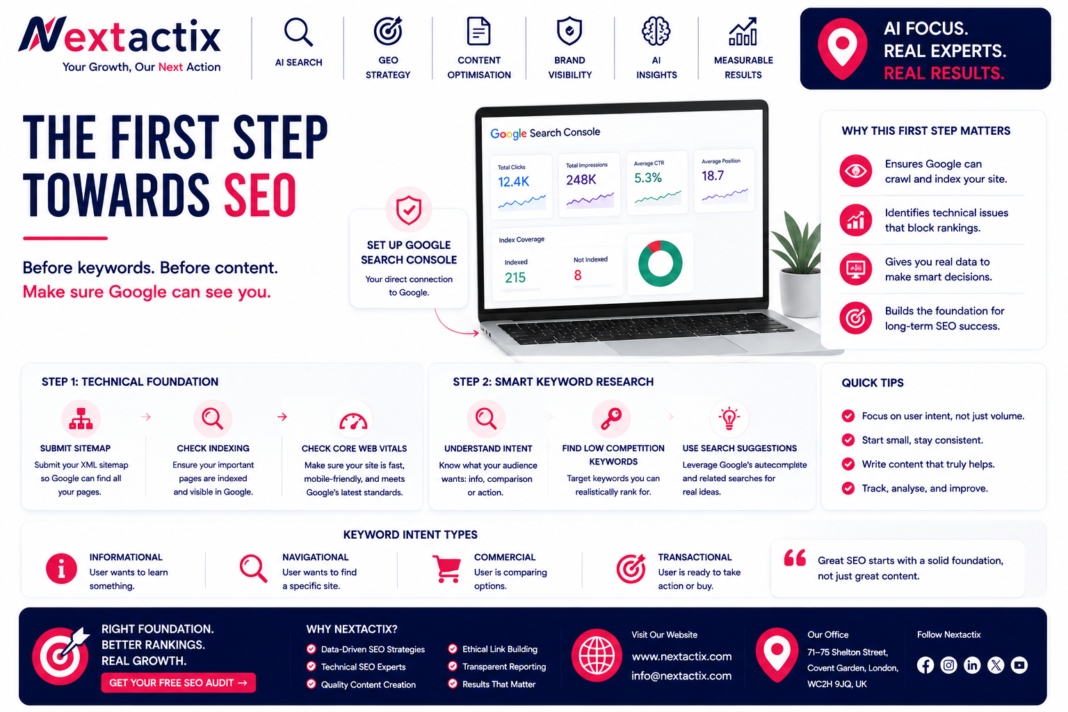
Set up Google Search Console before you do anything else. It is free, takes about ten minutes, and is the single most important diagnostic tool you have access to as someone starting SEO. It connects your website to Google directly and shows you how Google sees your site — which pages are indexed, which queries are generating impressions, and any errors that are preventing pages from appearing in results.
Once it is set up, check three things immediately. First, submit your XML sitemap — a file that lists all the pages on your website — to tell Google what exists on your site and make it easier for crawlers to find everything. Most website platforms (WordPress, Wix, Squarespace) generate this automatically. You just need to submit the URL to Search Console.
Second, check whether your most important pages are indexed. Use the URL inspection tool in Search Console and paste in your homepage URL. If Google has indexed it, it will say so. If it says the URL is not on Google, that is the problem to solve before anything else — because a page that is not indexed will never rank, regardless of how well optimised it is.
Third, check your Core Web Vitals in the Experience section of Search Console. Since Google’s March 2026 core update tightened its performance thresholds, sites with pages loading above two seconds on mobile are being actively downranked. If your pages are flagged as ‘Needs Improvement’ or ‘Poor,’ fix this before investing heavily in content.
A perfectly optimised page that Google cannot crawl is invisible. The technical foundation is not exciting. It is not optional either.
Now: Keyword Research — But Done Differently
Once you have confirmed Google can see your site, keyword research is the right next focus. But the version of keyword research that produces results in 2026 is more specific than most beginner guides describe.
The core shift is this: keyword research is no longer about finding words to put on your page. It is about understanding what the person behind a search actually wants — what problem they are trying to solve, what format of content would best serve them, and how close they are to making a decision. Google calls this search intent, and it has become one of the most significant ranking factors in modern SEO.
When Google analyses a search query, it categorises the intent behind it. Someone searching ‘what is SEO’ wants an explanation — informational intent. Someone searching ‘SEO agency pricing’ is comparing options before deciding — commercial investigation intent. Someone searching ‘hire SEO agency Nottingham‘ is ready to act — transactional intent. Google ranks different types of content for each of these intent types. If you publish the wrong content type for a keyword’s intent, you will not rank for it — regardless of how many times the keyword appears on the page.
Finding the right keywords for where you are right now
New websites have a specific problem that most keyword guides do not address directly: low domain authority. Your website, if it is new or has not been building SEO for long, has not yet earned the trust signals that allow you to compete for high-volume, high-competition terms. Chasing those terms from day one is not a strategy — it is a way to publish content that never ranks.
The smarter starting approach is to identify low-competition keywords — specifically, terms with a keyword difficulty score below 20 on tools like Ahrefs or Semrush — that are still relevant to your business. These terms have smaller search volumes, but they are ones where a newer site can genuinely appear in the top results within a reasonable timeframe. Ranking for ten smaller-volume keywords consistently produces more compounding traffic than spending six months chasing one term you never reach page one for.
Practically, start by making a list of every service you offer or every topic your business covers. Then ask: what question would someone be asking on Google just before they need what I offer? That question is often better keyword material than the direct service name, because it captures people in the research phase — before they have already decided which provider to use.
Use Google’s own search interface as a free research tool. Type a topic into Google and watch the autocomplete suggestions — these are pulled from real search data. Read the ‘People also ask’ questions that appear on search results pages. These are the actual questions Google has determined its users want answered about your topic, and they are often excellent content targets for beginners because they are specific, conversational, and frequently in the low-competition range.
Keyword Research Tools: What to Use and When
You do not need a paid tool to start keyword research, but you will eventually hit the limits of free options. Here is an honest breakdown of what is available and when each one earns its place.
Free tools worth using from day one
Google Search Console shows you what queries your site is already getting impressions for. Once you have had it set up for a few weeks, the data in the Performance report is some of the most valuable keyword intelligence you can get — because it shows you real searches that real users are running, and Google has already decided your site has some relevance to them.
AnswerThePublic maps out the questions people ask around any topic in a visual format. It is particularly useful for finding FAQ-style content opportunities — the kind of specific, question-answering content that performs well in both traditional search results and Google AI Overviews.
Google Keyword Planner is free but requires a Google Ads account. It shows search volume ranges and competition levels. The volume data is broad (it groups searches into bands rather than giving precise numbers) but it is enough to distinguish between a keyword with meaningful search volume and one that almost nobody uses.
When paid tools start earning their cost
If you are serious about SEO — running a business that depends on organic traffic, or managing SEO for clients — tools like Ahrefs, Semrush, or Mangools become worthwhile once you have enough basic SEO in place to make use of their data. Specifically, when you want accurate keyword difficulty scores, detailed competitor analysis, and backlink data, the free alternatives stop being sufficient.
The keyword difficulty score is what changes the most between free and paid tools. Without it, you are guessing at how competitive a keyword is. With it, you can make informed decisions about which terms to target first — and avoid spending months on content targeting terms that would take years of domain authority building to crack.
What to Do With Your Keywords Once You Have Them
Keyword research only produces results when it directly shapes what you create. The practical output of a keyword research session should be a simple content map: a list of the pages or articles you will create, each paired with a primary keyword, its search intent type, and the specific question or problem the content will answer.
Each page should target one primary keyword and a small cluster of semantically related terms — not because you are trying to fit more keywords onto the page, but because covering a topic comprehensively naturally uses the language people search with. A page about keyword research for beginners will naturally contain phrases like ‘search volume,’ ‘keyword difficulty,’ ‘long-tail keywords,’ and ‘search intent’ — because those concepts are part of the topic. That natural coverage is what Google’s algorithm rewards.
One consistent finding from sites that have held rankings through the 2024 and 2026 algorithm updates: the pages with the most durable rankings are those where the keyword is answered genuinely and specifically, not just included. The difference between a page that ranks and a page that drops is often one of specificity. Generic content that covers a topic from a distance gets displaced. Specific content that shows genuine knowledge of the subject — with examples, with nuance, with honest acknowledgment of what is complicated — holds its position.
The First 30 Days: A Realistic Starting Sequence
Rather than an aspirational checklist, here is the realistic sequence that produces the most progress in the first month:
In the first week, set up Google Search Console and Google Analytics 4. Submit your sitemap. Check that your key pages are indexed. Run a PageSpeed test and identify any critical performance issues. This is not glamorous work. It is the work that makes everything else possible.
In the second week, do your keyword research. Make a list of ten to fifteen specific, low-competition keywords that are relevant to your business and match the search intent of what you offer. Map each keyword to either an existing page that should be optimised for it, or a new page you will create.
In the third week, optimise your existing key pages — the homepage, the main service or product pages — for the keywords you have identified. This means ensuring the page title includes the primary keyword, the first paragraph addresses the search intent directly, the heading structure is logical, and the content is genuinely more useful than what currently ranks for that term.
In the fourth week, publish your first piece of new, keyword-targeted content. Write it specifically for the question a real person is asking, not for the keyword as an abstract phrase. Include a FAQ section at the bottom that directly answers the two or three related questions people are most likely to ask next. This FAQ approach does dual work: it improves traditional rankings and it makes the content more likely to appear in Google AI Overviews.
At the end of month one, check Search Console again. You are not expecting dramatic results yet. You are looking for signs that Google is starting to index your content, that impressions are accumulating for the keywords you targeted, and that there are no new technical errors that need addressing. Those early impressions — even without clicks — are evidence that the strategy is working.
If you want a faster diagnosis of where your site stands — technically, in keyword rankings, and in AI search — NextActix’s free SEO audit covers all of this and gives you a specific, prioritised action list rather than a generic set of recommendations.